"How much for delivery?"
If you sell online, you answer this question all day. Back and forth in DMs, working out fees by hand, quoting a different price for every neighbourhood and every city. And the moment a customer abroad asks "do you ship to the UK?" — it gets even messier.
We just made all of that automatic.
Shipping & Delivery is now live on Strawlo. Set your delivery prices once, and every customer sees the right fee at checkout — whether they're across town or across the world.
🚚 What is Shipping & Delivery?
It's a simple way to tell Strawlo what you charge for delivery and where. You create "zones" (groups of places) and set a flat price for each. At checkout, the customer picks where their order is going, and the matching fee is added to their total — no DMs, no manual maths.
How it works — just two pieces
There are only two things to understand:
📍
Zones — the "where"
A zone is a group of countries you deliver to. For example, a "Ghana" zone, or a "Rest of the world" zone.
💵
Rates — the "how much"
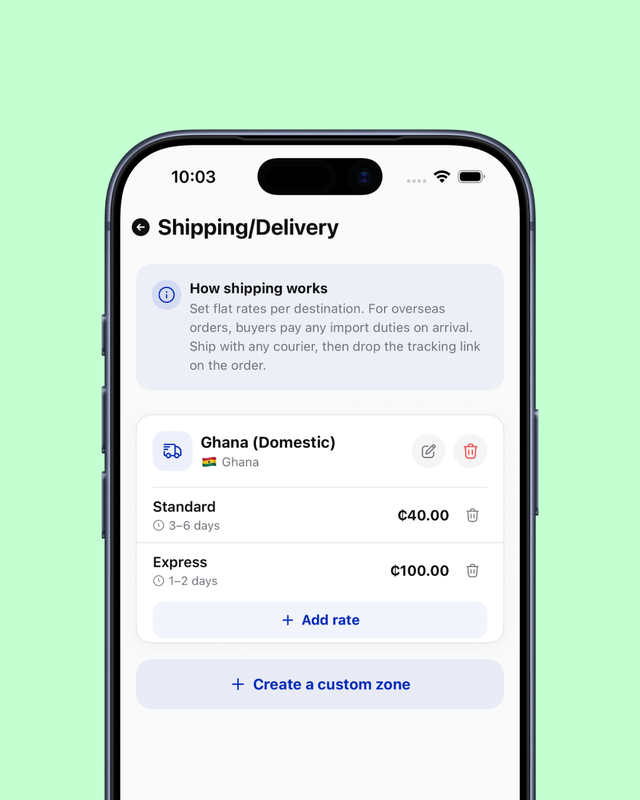
A rate is a flat delivery price inside a zone. A zone can have a few — say "Standard" and "Express" — and the customer chooses one.
That's it. Zones say where, rates say how much.
Getting started takes one tap
Open Store settings → Shipping/Delivery. On a fresh store you'll see two buttons:
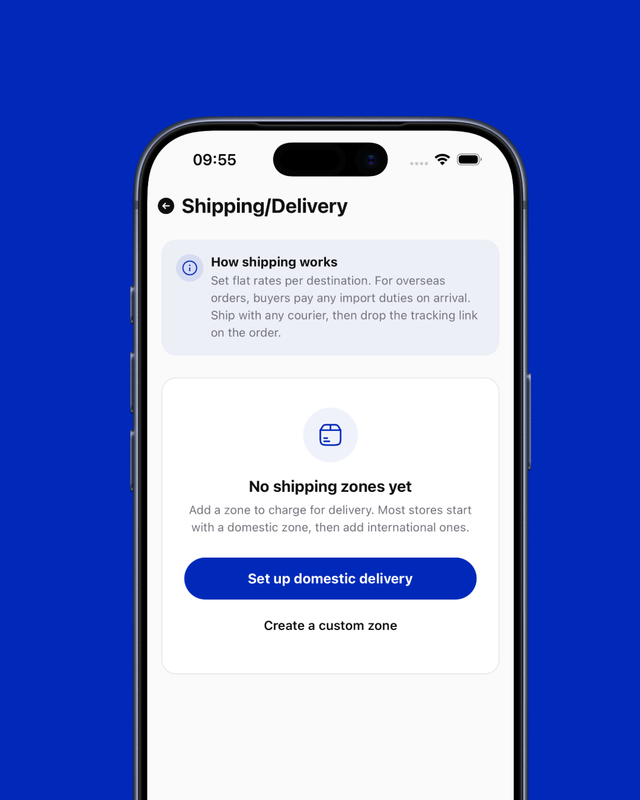
- Set up domestic delivery — instantly creates a starter zone for your own country. The fastest way to begin.
- Create a custom zone — build one yourself.
When you create a zone, you choose what it covers:
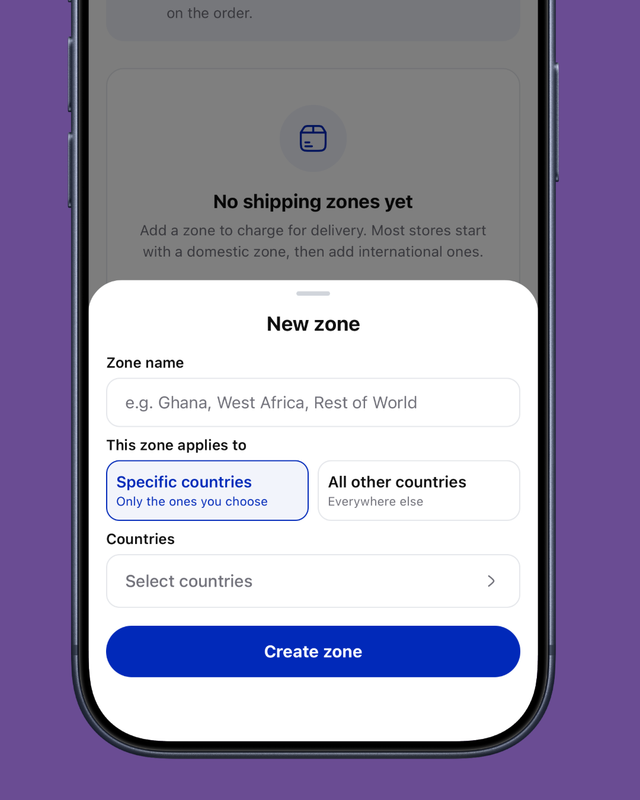
- Specific countries — only the places you pick (e.g. Ghana).
- All other countries — your "rest of the world" zone, which automatically covers anywhere you haven't listed.
The one idea to remember: a zone is either a list of specific countries, or the catch-all for everywhere else. So you might have a Ghana zone at GH₵30 and a Rest of the world zone at GH₵600. Ghanaians see GH₵30; everyone else sees GH₵600.
Set your prices (and even offer free delivery)
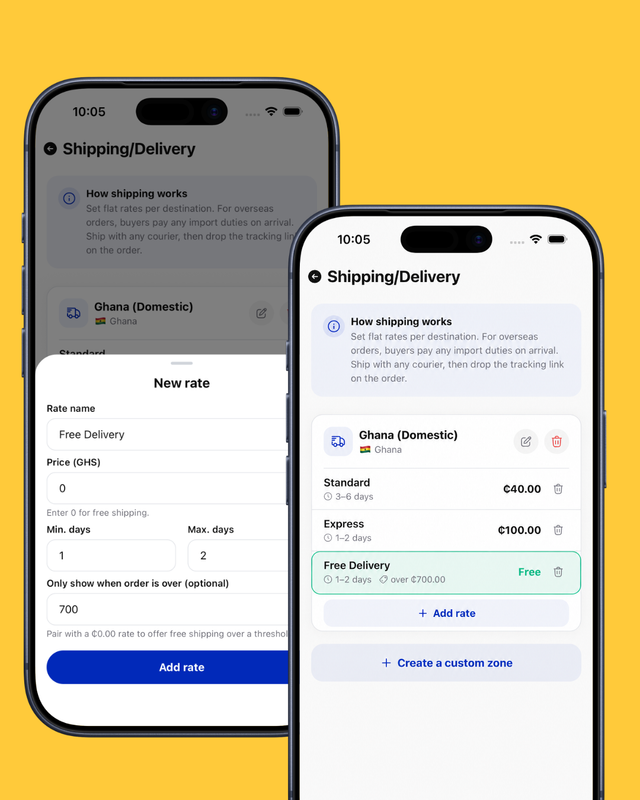
Inside a zone, tap Add rate and give it a name, a price, and (optionally) a delivery-time estimate like "2–4 days."
Want to reward bigger orders? Add a rate priced at 0 and set "Only show when order is over" to your threshold — say GH₵500. Customers who spend above that automatically get free delivery.
What your customers see
At checkout, it's effortless for them:
- They choose their delivery country.
- They see the delivery options and prices for that place.
- They pick one — and it's added to their total.
No guessing, no "I'll message you the fee later." Just a clear price, instantly.
Going global? We've got the details covered
Now that Strawlo supports international payments, this feature was built to ship worldwide:
🌍
Duties handled fairly
Import duties and taxes are paid by the customer on arrival — and they're clearly told this at checkout, so there are no surprises for you or them.
🏠
Full addresses
For places that need a unit number (like the USA), customers get an "Apartment, suite, unit" field so nothing gets lost.
One thing to note: Pay on Delivery isn't offered for international orders — it only works for local, in-person cash handover. Overseas customers simply pay online.
You stay in control of delivery
Strawlo doesn't ship for you, and that's on purpose — you keep full control. Once an order is paid, send it with any courier you like: a dispatch rider, GhanaPost, a freight forwarder, anyone. Then open the order and drop in the tracking link so your customer can follow it.
The delivery fee you charged shows up on the order, the customer's confirmation page, and their receipt.
It's optional — nothing breaks
If you'd rather keep quoting delivery by hand, you don't have to touch this. Leave shipping unset and checkout works exactly as before — no fee is added and you arrange delivery directly. And even with zones set up, checkout is never blocked: if a customer's country isn't covered, the sale still goes through and you sort delivery with them.
Set it up in two minutes
Head to Store settings → Shipping/Delivery on the Strawlo app or your dashboard, and tap Set up domestic delivery to begin.
Stop calculating delivery fees by hand. Set them once, and let Strawlo do the rest. 🚚
Get weekly business tips
Join 1,000+ entrepreneurs growing their online businesses.
No spam, ever. Unsubscribe anytime.
Related articles
Adding Products Just Got Faster: Snap a Photo, Let AI Fill It In, Done

WhatsApp Broadcast: Message Every Customer You've Ever Sold To