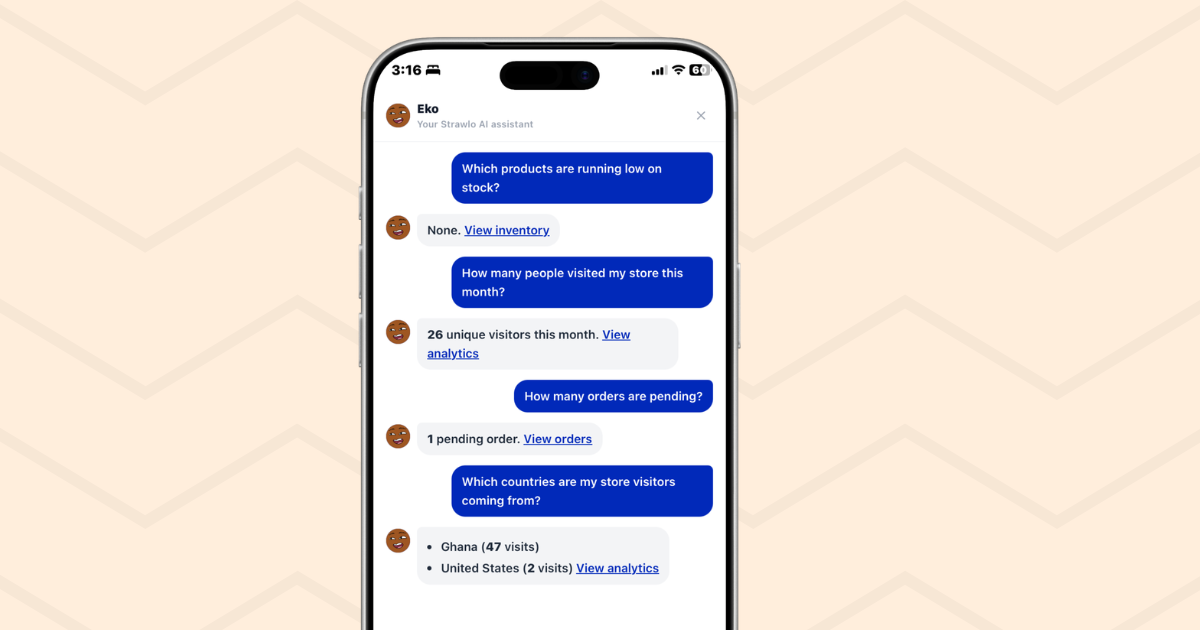
Running a business means you're always asking questions. How much did I make today? Which products are running low? Do I have any pending orders I need to fulfil? How did this month compare to last month?
The answers are all somewhere in your dashboard, but checking them means navigating between pages, loading reports, doing math in your head. It adds up.
Eko changes that. Ask your question in plain English and get an instant answer pulled directly from your live store data.
What Is Eko?
Eko is Strawlo's built-in AI business assistant. It lives inside your dashboard — accessible from a button in your top navigation bar — and answers questions about your store in real time.
It's not a chatbot that gives you generic advice. Eko reads your actual store data: your orders, your revenue, your customers, your products, your discounts, your reviews, your analytics. Every answer is specific to your store, not a template.
Eko is powered by Google Gemini, one of the most capable AI models available today. But you don't need to know anything about AI to use it — just ask your question the same way you'd ask a colleague.
How to Open Eko
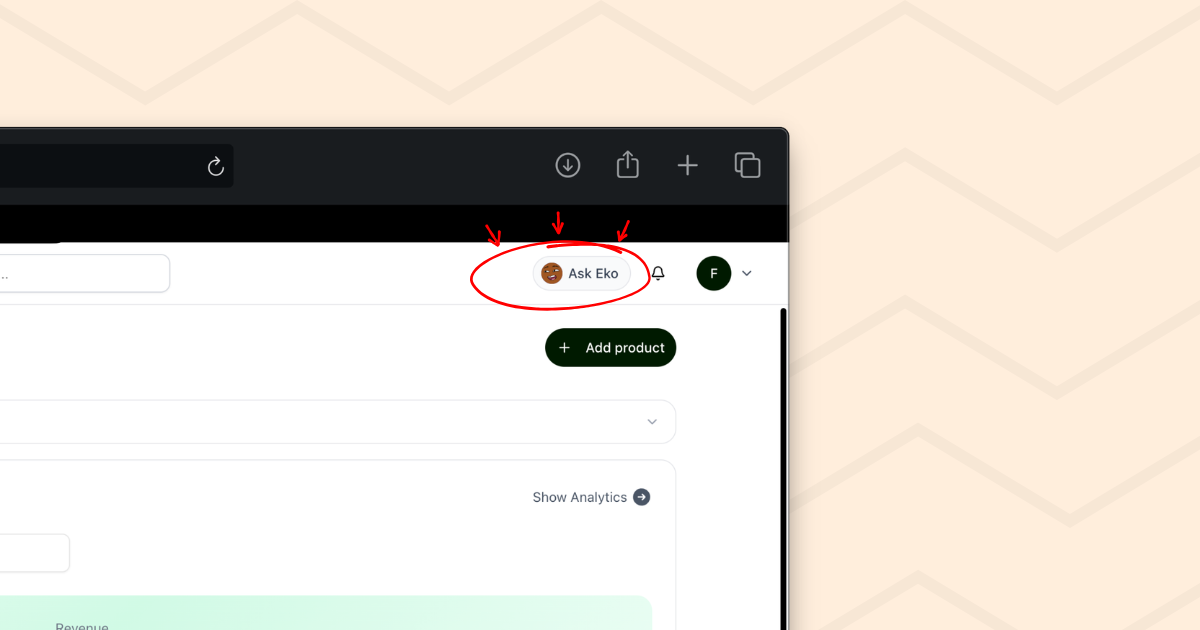
On desktop: Click the "Ask Eko" pill in the top navigation bar. A panel slides in from the right side of your dashboard. Your page content shifts to the left — you can still see and use your dashboard while chatting with Eko.
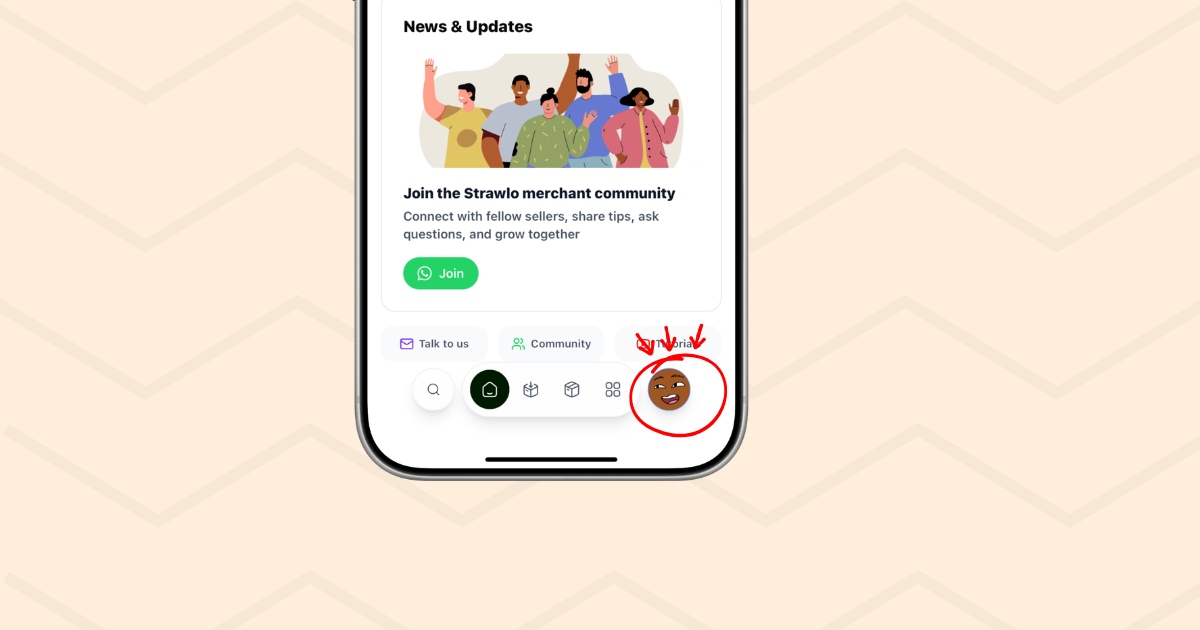
On mobile: Tap the Eko avatar icon in the bottom navigation bar. Eko opens as a full-screen panel, similar to opening a chat app.
What Eko Knows About Your Store
The moment you open Eko, it fetches a real-time snapshot of your store data. It has access to:
Revenue
- Today's revenue, with a comparison to yesterday
- This week's revenue vs last week
- This month's revenue vs last month
- All-time revenue and average order value
Orders
- Total orders, pending orders, delivered orders
- Recent 20 orders with customer names, amounts, statuses, cities, and the items in each order
- Month-over-month order count comparison
Customers
- Total customer count and new customers this month
- Your top 5 customers ranked by total spend
Products
- Your full product catalogue with prices and stock levels
- Products that are low on stock (5 units or fewer)
- Out-of-stock products
- Your top 10 best-selling products by units sold
Promotions
- Active flash deals with titles, discounts, and end dates
- All your discount codes — active and inactive — with usage counts
Reviews
- Total review count, published reviews, and your average star rating
- Your 5 most recent reviews
Analytics
- Store visits today, this week, and this month
- Total visits over the last 30 days
- Your top countries by traffic
Pixels & Tracking
- Which tracking pixels you have set up and whether they're active and verified
Payment Links
- Your 10 most recent payment links with customer names, amounts, and statuses
Subscription & Billing
- Your current plan name and billing interval
- Subscription status and renewal date
- Plan limits (products, stores, categories)
A Snapshot Before You Even Ask
When you open Eko, it doesn't wait for you to ask something. It immediately shows you a quick summary of where your store stands right now — today's revenue, pending orders, any stock alerts. You get context the moment the panel opens.
This snapshot is built directly from your live data and doesn't use an AI call, so it appears instantly.
How Eko Works
Conversation Memory
Eko remembers everything said within a session. If you ask "how many orders do I have?" and then ask "who placed the most recent one?" — Eko knows you're still talking about orders. You don't have to repeat yourself or provide context with every message.
This makes conversations with Eko feel natural, not like filling out a form one question at a time.
Trend Comparisons
Eko doesn't just tell you what the numbers are — it tells you how they compare. When you ask about your revenue or orders, Eko calculates the percentage change vs the prior period and includes it in the answer.
For example, if you ask "how am I doing this week?", Eko might say:
This week's revenue is GH₵1,240 — up 34% vs last week. You've had 8 orders so far this week compared to 6 last week.
This gives you context, not just a number.
Clickable Links to Your Dashboard
When Eko mentions something actionable — pending orders, low stock, customers — it includes a direct link to the relevant page in your dashboard. You don't have to navigate there manually.
Ask about pending orders and Eko links you straight to your orders page filtered by pending status. Ask about low stock and you get a link to your inventory. The answers connect directly to the place where you can take action.
Formatted, Readable Responses
Eko's responses use formatting to make them easier to scan. Key numbers are bold. Multiple items are presented as bullet lists. Sections are separated clearly. You're not reading a wall of text — you're getting structured information you can act on quickly.
Order Item Details
Eko knows what's inside each order. When you ask about a specific customer or order, Eko can tell you exactly which products they bought, the quantities, and how much each item cost. No more navigating to the order details page just to check what someone purchased.
Streaming Responses
Eko's answers appear word by word as they're generated, instead of making you wait for the full response. This makes conversations feel faster and more natural — you can start reading the answer while Eko is still finishing it.
Proactive Insights
Eko doesn't just wait for you to ask the right question. When you ask something general like "how's my store doing?" or "any updates?", Eko proactively highlights things that need your attention:
- Products that are out of stock or running low
- Revenue trending up or down compared to last week
- Orders waiting to be fulfilled
- Repeat customers who haven't left a review yet
- Your conversion rate (visits to orders) for the week
These insights help you spot problems and opportunities you might not have thought to ask about.
Faster Follow-Up Messages
Eko caches your store data for 60 seconds between messages. This means your first question fetches everything fresh, but follow-up questions in the same conversation respond much faster — no need to re-query your entire store for every single message.
What Eko Won't Do
Eko is focused on your store. It won't answer general knowledge questions, give you recipes, or help you draft a message to a customer. If you ask it something outside of your store data, it'll politely tell you it can only help with store-related questions.
For questions that require detail beyond what the data provides — like a full delivery address — Eko will point you to the right page in your dashboard.
When Eko Doesn't Know the Answer
If a question genuinely can't be answered from your store data, Eko tells you clearly and gives you a way to get help. It'll direct you to Strawlo support via WhatsApp or email so you're never stuck.
Who Is Eko For?
Eko is built for merchants who are busy. You're packing orders, responding to customers, managing suppliers, posting on Instagram — you don't always have time to open a report. Eko lets you get the answer in 10 seconds without breaking your flow.
It's especially useful:
- At the start of your day — open Eko, see where you stand immediately
- Before restocking — ask which products are low or out of stock
- When a customer asks — quickly check their order status without navigating away
- At the end of the month — compare your performance to last month without building a spreadsheet
- When you're on mobile — get answers without trying to read small dashboard numbers on a phone screen
Multi-Store Support
If you manage multiple stores on Strawlo (available on the Business+ plan), Eko always answers about your currently active store. When you switch stores, Eko's conversation resets — so you're always getting answers for the right store, not mixing up data between them.
Eko Will Keep Getting Smarter
We're continuously improving Eko. Since launch, we've added order item details, streaming responses, proactive insights, subscription awareness, and faster response times. Future updates will continue expanding what Eko knows and how it can help you run your store.
Open Eko and try asking "how's my store doing?" — you might be surprised by what it catches.
Eko is available to all Strawlo merchants. Open your dashboard and tap "Ask Eko" to get started.
Get weekly business tips
Join 1,000+ entrepreneurs growing their online businesses.
No spam, ever. Unsubscribe anytime.
Related articles

Adding Products Just Got Faster: Snap a Photo, Let AI Fill It In, Done

WhatsApp Broadcast: Message Every Customer You've Ever Sold To